Compile and Install UCX 1.15.0 and OpenMPI 5.0.0: A Comprehensive Guide
Unified Communication X (UCX) and Open Message Passing Interface (OpenMPI) are two indispensable components in the field of high-performance computing. UCX provides an efficient set of low-level communication libraries, optimizing hardware resource utilization, while OpenMPI is a message passing interface widely used in parallel computing tasks. This article will provide detailed guidance on how to compile and install UCX version 1.15.0 from source code and the compatible OpenMPI version 5.0.0.
1. Environment Preparation
First, please ensure that your system meets the following basic requirements:
Operating System: Supports Linux (such as Ubuntu 20.04 LTS) or other Unix-like operating systems.
Development Toolkit: Install the necessary build tools and libraries, such as build-essential, libnuma-dev, pkg-config, etc.
Kernel version: For optimal performance, it is recommended to use the latest stable version of the kernel.
Hardware environment or virtual environment that requires RDMA support.
You can add more configuration options according to actual needs, such as specifying a specific network card type or enabling specific features.
Compile and install:
1
2
make -j 8make install
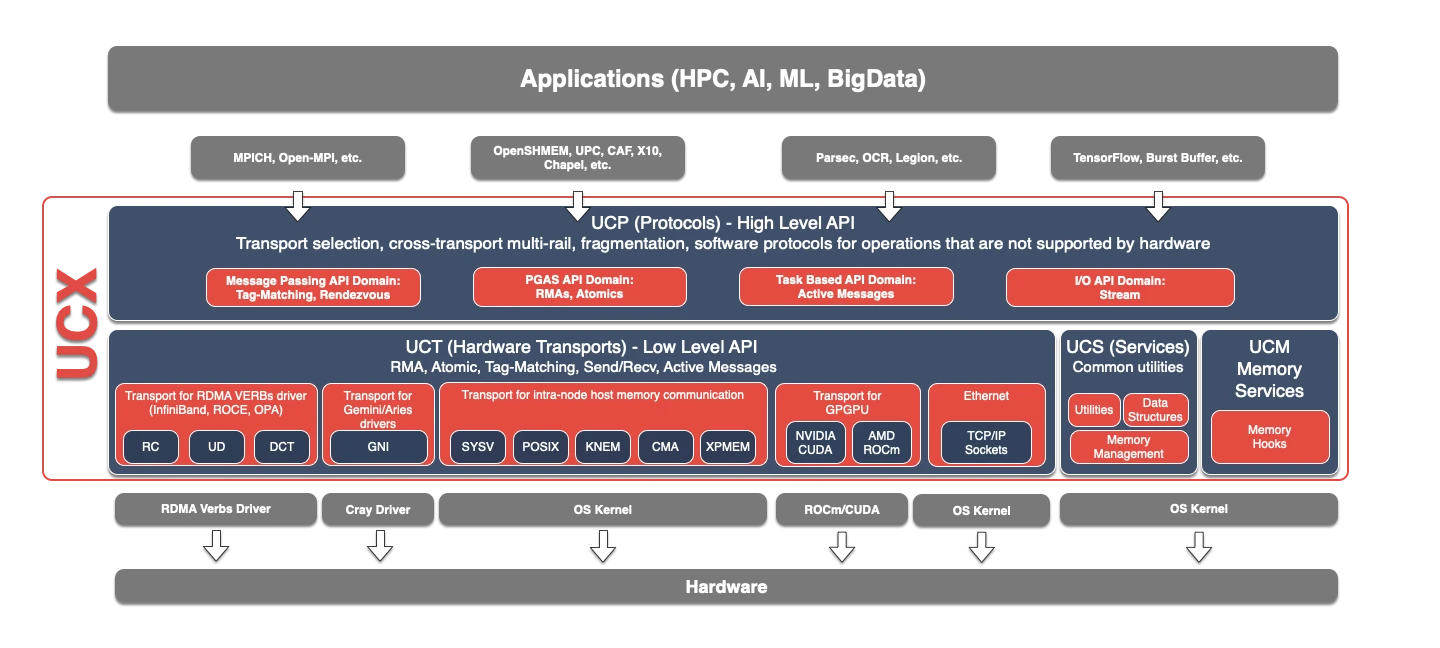
UCX Architecture Description
The architecture of UCX 1.15.0 is shown in the figure below:
Component
Role
Description
UCP
Protocol
Implements advanced abstractions, such as tag matching, streams, connection negotiation and establishment, multi-track, and handling different types of memory.
UCT
Transport
Implements low-level communication primitives, such as active messages, remote memory access, and atomic operations.
UCM
Memory
A collection of general data structures, algorithms, and system utilities.
UCP
Protocol
Intercept memory allocation and release events used by memory registration cache.
3. Compile and Install OpenMPI 5.0.0
Download the OpenMPI source package:
1
2
3
wget https://download.open-mpi.org/release/open-mpi/v5.0/openmpi-5.0.0.tar.gz
tar -xzvf openmpi-5.0.0.tar.gz
cd openmpi-5.0.0
Configure OpenMPI compile options, specifying the use of UCX as the transport layer:
For OpenMPI 4.0 and later versions, there may be compilation errors with the btl_uct component. This component is not important for using UCX; therefore, it can be disabled with --enable-mca-no-build=btl-uct:
The --enable-python-bindings option is used to enable Python bindings.
The --enable-mpirun-prefix-by-default option is used to automatically add the --prefix option when starting an MPI program with mpirun.
The --without-hcoll option is used to disable the HCOLL component. If not set during compilation, it will report errors cannot find -lnuma and cannot find -ludev.
The final configuration options are as follows:
Compile and install:
1
2
make -j 8make install
4. Verify Installation and Set Environment Variables
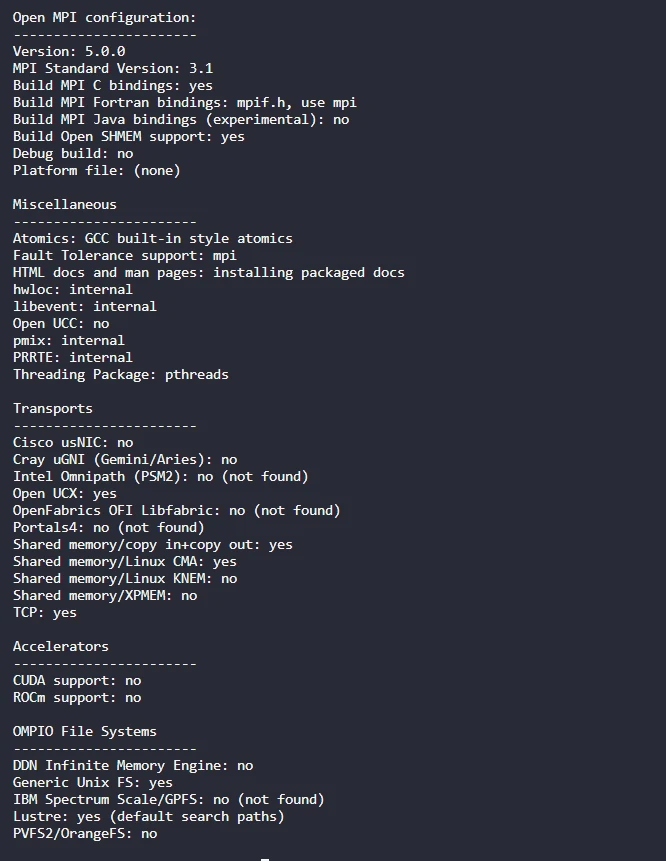
After installation, you can verify whether UCX and OpenMPI have been successfully integrated by running a simple MPI program:
One way is to first allocate resources through salloc, and then run the mpirun command on the allocated resources. At this time, --hostfile, --host, -n, etc. do not need to be set, for example:
If everything is normal, you will see the output of the two hostnames. For convenience, you can add the OpenMPI bin directory and others to the system PATH environment variable:
1
2
3
4
5
6
vim ~/.bashrc
exportPATH=/root/software/openmpi/5.0.0-ucx-1.15.0/bin:$PATHexportLD_LIBRARY_PATH=/root/software/openmpi/5.0.0-ucx-1.15.0/lib:$LD_LIBRARY_PATHexportCPATH=/root/software/openmpi/5.0.0-ucx-1.15.0/include:$CPATHexportMANPATH=/root/software/openmpi/5.0.0-ucx-1.15.0/share/man:$MANPATHsource ~/.bashrc
In summary, through the above steps, we have successfully compiled and installed UCX 1.15.0 and OpenMPI 5.0.0 from the source code, and integrated them into an efficient and stable high-performance computing environment. In practical applications, you can further optimize the configuration according to specific needs to achieve better performance.